6.1. Authentication Modes and Client Modes
privacyIDEA supports a variety of tokens that implement different
authentication flows. We call these flows authentication modes. Currently,
tokens may implement three authentication modes, namely authenticate,
challenge and outofband.
Application plugins need to implement the three authentication modes separately, as the modes differ in their user experience. To help the plugins identify the flow, the JSON response of an authentication request contains additional information in the section
{
  "detail": {
    "multi_challenge": [
      {
        "client_mode": "poll"
      }
    ]
  }
}
The “client_mode” gives the plugin even more information on how to respond.
The authentication mode challenge can either result in client_mode interactive
or webauthn, and the authentication mode outofband results in client mode
poll, or in interactive for a push token with push_code_to_phone,
where the user types the code shown on the smartphone.
Here are examples for the flows:
The HOTP token type implements the
authenticatemode, which is a single-shot authentication flow. For each authentication request, the user uses their token to generate a new HOTP value and enters it along with their OTP PIN. The plugin sends both values to privacyIDEA, which decides whether the authentication is valid or not.The email and SMS token types implement the
challengemode. With such a token, the authentication flow consists of two steps: In a first step, the plugin triggers a challenge. privacyIDEA sends the challenge response — a fresh OTP value — to the user via email or SMS. In a second step, the user responds to the challenge by entering the respective OTP value in the plugin’s login form. The plugin sends the challenge response to privacyIDEA, which decides whether the authentication is valid or not. The “client_mode” is set tointeractive. This indicates that the plugin should display an input field, so that the user can enter the response interactively.WebAuthn tokens also implement the
challengemode. However, the plugin needs to handle these challenges differently, since the user does not need to enter the response to the challenge manually. The “client_mode” is set towebauthnso that the plugin can handle the cryptographic challenge accordingly.The PUSH and TiQR token types implement the
outofbandmode. With a PUSH token, the authentication flow also consists of two steps: In a first step, the user triggers a challenge. privacyIDEA pushes the challenge to the user’s smartphone app. In a second step, the user approves the challenge on their phone, and the app responds to the challenge by communicating with the privacyIDEA server on behalf of the user. The plugin periodically queries privacyIDEA to check if the challenge has been answered correctly and the authentication is valid. In this case the “client_mode” is set topoll, so that the plugin knows, that it needs to poll for the response to the challenge.
The following describes the authentication flows of the three authentication modes in more detail.
6.1.1. authenticate mode
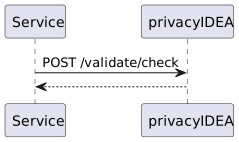
The Service is an application that is protected with a second factor by privacyIDEA.
The user enters an OTP PIN along with an OTP value at the Service.
The plugin sends a request to the
/validate/checkendpoint of privacyIDEA:POST /validate/check HTTP/1.1 Accept: application/json user=<user> pass=<PIN+OTP>
and privacyIDEA returns whether the authentication request has succeeded or not.
6.1.2. challenge mode
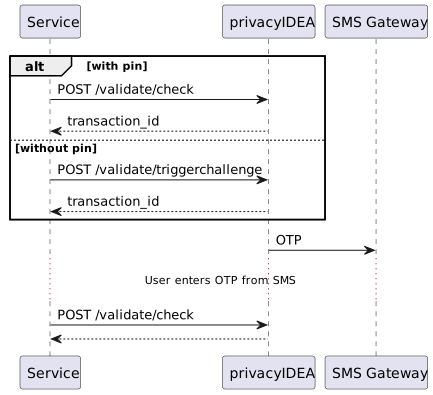
The plugin triggers a challenge, for example via the
/validate/triggerchallengeendpoint. This endpoint requires the authorization token of an administrator in thePI-Authorizationheader, typically of a service account that only has the admin policy triggerchallenge:POST /validate/triggerchallenge HTTP/1.1 PI-Authorization: <admin token> user=<user>
Alternatively, a challenge can be triggered via the
/validate/checkendpoint with the PIN of a challenge-response token:POST /validate/check HTTP/1.1 user=<user> pass=<PIN>
In both variants, the plugin receives a transaction ID which we call
transaction_idand asks the user for the challenge response.The user enters the challenge response, which we call
OTP. The plugin forwards the response to privacyIDEA along with the transaction ID:POST /validate/check HTTP/1.1 user=<user> transaction_id=<transaction_id> pass=<OTP>
and privacyIDEA returns whether the authentication request succeeded or not.
To clean up expired challenges read the Clean up challenges section.
6.1.3. outofband mode
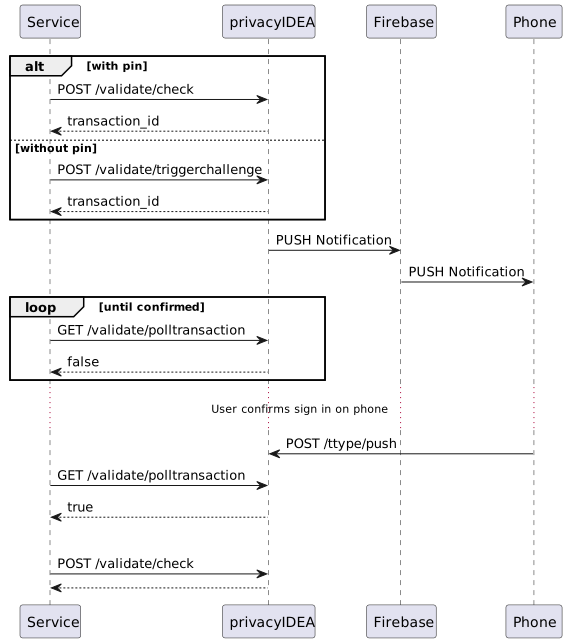
The plugin triggers a challenge, for example via the
/validate/triggerchallengeendpoint. This endpoint requires the authorization token of an administrator in thePI-Authorizationheader, typically of a service account that only has the admin policy triggerchallenge:POST /validate/triggerchallenge HTTP/1.1 PI-Authorization: <admin token> user=<user>
or via the
/validate/checkendpoint with the PIN of an out-of-band token:POST /validate/check HTTP/1.1 user=<user> pass=<PIN>
In both variants, the plugin receives a transaction ID which we call
transaction_id. The plugin may now periodically query the status of the challenge by polling the/validate/polltransactionendpoint:GET /validate/polltransaction HTTP/1.1 transaction_id=<transaction_id>
The endpoint returns
trueonce the challenge has been answered (detail.challenge_statusis thenaccept). Withfalse,detail.challenge_statustells the cases apart:pendingmeans the challenge has not been answered yet, or that no valid challenge exists for this transaction ID (for example because it has expired);declinedorcancelledmeans the user refused the challenge, andresult.authenticationis thenDECLINED. Stop polling ondeclinedandcancelled.The user approves the challenge on a separate device, e.g. their smartphone app. The app communicates with a tokentype-specific endpoint of privacyIDEA, which marks the challenge as answered. The exact communication depends on the token type.
Once
/validate/polltransactionreturnstrue, the plugin must finalize the authentication via the/validate/checkendpoint:POST /validate/check HTTP/1.1 user=<user> transaction_id=<transaction_id> pass=
For the
passparameter, the plugin sends an empty string.This step is crucial because the
/validate/checkendpoint takes defined authentication and authorization policies into account to decide whether the authentication was successful or not.Note
There are two distinct time windows involved:
The answer window is the challenge validity time. The user has to approve (or decline) the challenge on their separate device within this window. An answer arriving after the challenge has expired is rejected.
For push tokens, the finalize window starts once the challenge has been answered. Answering the challenge pushes its expiration out to at least
PushChallengeFinalizeGraceseconds (default 300) from that moment, so that the plugin can still finalize the authentication via/validate/checkafterwards. The expiration only ever moves forward, so with an answer window longer than the grace period, the challenge may stay redeemable until its original expiration. Once the challenge finally expires it can no longer be redeemed and the transaction has to be started again.
A TiQR challenge has no finalize window: the answer and the finalizing
/validate/checkboth have to happen within the original challenge validity time. An answer that arrives shortly before the challenge expires leaves the plugin only the remaining validity time to finalize.Both windows behave identically whether or not the Redis challenge cache is enabled. See Push Token for the push durations.
Note
The
/validate/polltransactionendpoint does not require authentication and does not increase the failcounters of tokens. Hence, attackers may try to brute-force transaction IDs of correctly answered challenges. Due to the short expiration timeout and the length of the randomly-generated transaction IDs, it is unlikely that attackers correctly guess a transaction ID in time. Nonetheless, plugins must not allow users to inject transaction IDs, and plugins must not leak transaction IDs to users.