5.8. SMS Gateway configuration
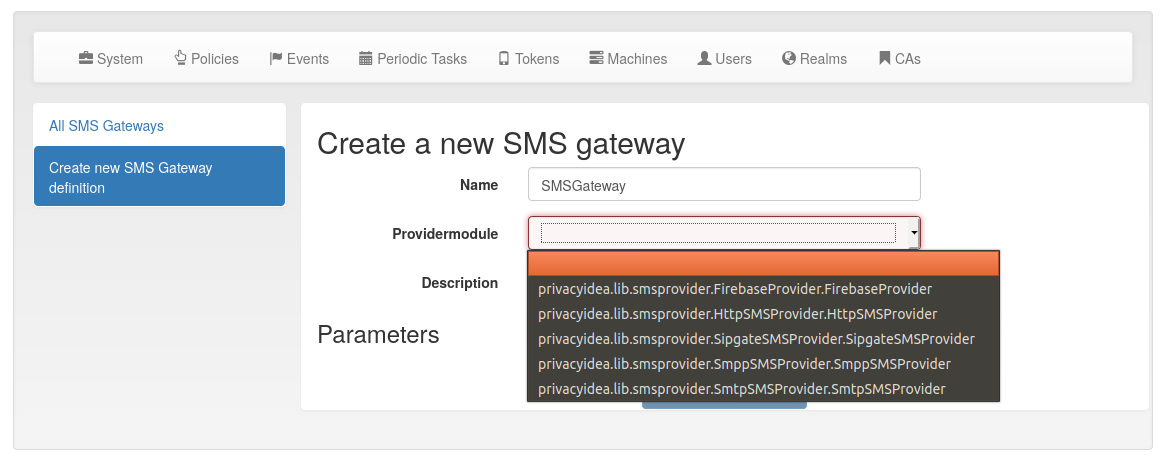
You can centrally define SMS gateways that can be used to send SMS with SMS Token or to use the SMS gateway for sending notifications.
There are different providers (gateways) to deliver SMS.
5.8.1. Firebase Provider
The Firebase provider was added in privacyIDEA 3.0. It sends notifications via the Google Firebase service and this is used for the Push Token. For an exemplary configuration, you may have a look on the articles on the privacyIDEA community website tagged with push token.
JSON config file
This is the location of the configuration file of the Firebase service. It has to be located on the privacyIDEA server.
You can get the necessary JSON config file, from your Firebase console. The default PUSH authenticator App (privacyIDEA Authenticator) which you can find in Google Play Store and Apple App Store uses a Firebase project, that is managed by the company NetKnights. You need to get an SLA to receive a JSON config file for accessing the project.
5.8.2. HTTP provider
The HTTP provider can be used for any SMS gateway that provides a simple HTTP POST or GET request. This is the most commonly used provider. Each provider type defines its own set of parameters.
The following parameters can be used. These are parameters, that define the behaviour of the SMS Gateway definition.
CHECK_SSL
If the URL is secured via TLS (HTTPS), you can select, if the certificate should be verified or not.
PROXY, HTTP_PROXY and HTTPS_PROXY
You can specify a proxy to connect to the HTTP gateway. Use the specific values to separate HTTP and HTTPS.
REGEXP
Regular expression to modify the phone number to make it compatible with provider.
Example: If you want to replace the leading zero with your country code like 0123456789 -> 0049123456789, then you need to enter
/^0/0049/.
HTTP_METHOD
Can be GET or POST.
RETURN_FAIL
If the text of
RETURN_FAILis found in the HTTP response of the gateway privacyIDEA assumes that the SMS could not be sent and an error occurred.
RETURN_SUCCESS
You can either use
RETURN_SUCCESSorRETURN_FAIL. If the text ofRETURN_SUCCESSis found in the HTTP response of the gateway privacyIDEA assumes that the SMS was sent successfully.
TIMEOUT
The timeout for contacting the API and receiving a response.
URL
This is the URL for the gateway.
USERNAME and PASSWORD
These are the username and the password if the HTTP request requires basic authentication.
5.8.2.1. Options
You can define additional options. These are sent as parameters in the GET or POST request.
The options can have JSON or strings as values. privacyIDEA will try to parse the values as JSON and either send JSON or strings to the HTTP gateway.
Note
You can use the tags {phone} to specify the phone number. The tag {otp}
will be replaced simply with the OTP value or with the contents created
by the policy smstext.
5.8.2.2. Examples
5.8.2.2.1. Clickatell
In case of the Clickatell provider the configuration will look like this:
HTTP_METHOD: GET
RETURN_SUCCESS: ID
Set the additional options to be passed as HTTP GET parameters:
user: YOU
password: your password
api_id: you API ID
text: “Your OTP value is {otp}”
to: {phone}
This will construct an HTTP GET request like this:
http://api.clickatell.com/http/sendmsg?user=YOU&password=YOU&\
     api_id=YOUR API ID&text=....&to=....
where text and to will contain the OTP value and the mobile
phone number. privacyIDEA will assume a successful sent SMS if the
response contains the text “ID”.
5.8.2.2.2. GTX-Messaging
GTX-Messaging is an SMS Gateway located in Germany.
The configuration looks like this (see [2]):
HTTP_METHOD: GET
CHECK_SSL: yes
RETURN_SUCCESS: 200 OK
You need to set the additional options:
user: <your account>
pass: <the account password>
to: {phone}
text: Your OTP value is {otp}.
Note
The user and pass are not the credentials you use to login. You can find the required credentials for sending SMS in your GTX messaging account when viewing the details of your routing account.
5.8.2.2.3. Twilio
You can also use the Twilio service for sending SMS. [1].
URL: https://api.twilio.com/2010-04-01/Accounts/B…8/Messages
HTTP_METHOD: POST
For basic authentication you need:
USERNAME: your accountSid
PASSWORD: your password
Set the additional options as POST parameters:
From: your Twilio phone number
Body: {otp}
To: {phone}
5.8.2.2.4. SMSEagle
You can send OTP messages by using the SMSEagle hardware SMS gateway (requires physical hardware). [3]
Parameters:
HTTP_METHOD: POST
RETURN_SUCCESS: queued
RETURN_FAIL: REJECTED
SEND_DATA_AS_JSON: yes
Headers:
access-token: your-access-token
Options:
to: [“{phone}”]
text: “Your OTP: {otp}”
You can personalize the text option, but you must place it inside double-quotes and must include the {otp} value.
5.8.3. Sipgate provider
The sipgate provider connects to https://samurai.sipgate.net/RPC2 and takes only two arguments USERNAME and PASSWORD.
Parameters:
USERNAME
The sipgate username.
PASSWORD
The sipgate password.
PROXY
You can specify a proxy to connect to the HTTP gateway.
It takes not options.
If you activate debug log level you will see the submitted SMS and the response content from the Sipgate gateway.
Footnotes
5.8.4. SMPP Provider
The SMPP provider was added in privacyIDEA 2.22. It uses an SMS Center via the SMPP protocol to deliver SMS to the users.
You need to specify the SMSC_HOST and SMSC_PORT to talk to the SMS center. privacyIDEA need to authenticate against the SMS center. For this you can add the parameters SYSTEM_ID and PASSWORD. The parameter S_ADDR is the sender’s number, shown to the users receiving an SMS. For the other parameters contact your SMS center operator.
5.8.5. SMTP provider
The SMTP provider sends an email to an email gateway. This is a specified, fixed mail address.
The mail should contain the phone number and the OTP value. The email gateway will send the OTP via SMS to the given phone number.
BODY
This is the body of the email. You can use this to explain the user, what he should do with this email. You can use the tags
{phone}and{otp}to replace the phone number or the one time password.
MAILTO
This is the address where the email with the OTP value will be sent. Usually this is a fixed email address provided by your SMTP Gateway provider. But you can also use the tags
{phone}and{otp}to replace the phone number or the one time password.
SMTPIDENTIFIED
Here you can select on of your centrally defined SMTP servers.
SUBJECT
This is the subject of the email to be sent. You can use the tags
{phone}and{otp}to replace the phone number or the one time password.
The default SUBJECT is set to {phone} and the default BODY to {otp}.
You may change the SUBJECT and the BODY accordingly.
5.8.6. Script provider
The Script provider calls a script which can take care of sending the SMS. The script takes the phone number as the only parameter. The message is expected at stdin.
Scripts are located in the directory /etc/privacyidea/scripts/. You can change this default
location by setting the value in PI_SCRIPT_SMSPROVIDER_DIRECTORY in The Config File.
In the configuration of the Script provider you can set two attributes.
SCRIPT
This is the file name of the script without the directory part.
BACKGROUND
Here you can choose, whether the script should be started and run in the background or if the HTTP requests waits for the script to finish.