10. Periodic Tasks
Starting with version 2.23, privacyIDEA comes with the ability to define periodically recurring tasks in the Web UI. The purpose of such tasks is to periodically execute certain processes automatically. The administrator defines which tasks should be executed using task modules. Currently there are task modules for simple statistics and for handling recorded events. Further task modules can be added easily.
As privacyIDEA is a web application, it can not actually execute the defined periodic tasks itself. For that,
privacyIDEA comes with a script privacyidea-cron which must be invoked by the system cron daemon.
This can, for example, be achieved by creating a file /etc/cron.d/privacyidea with the following
contents (this is done automatically by the Ubuntu package):
*/5 * * * * privacyidea privacyidea-cron run_scheduled -c
This tells the system cron daemon to invoke the privacyidea-cron script every five minutes. At
each invocation, the privacyidea-cron script determines which tasks should be executed and
execute the scheduled tasks. The -c option tells the script to be quiet and only print to stderr
in case of an error (see The privacyidea-cron script).
Periodic tasks can be managed in the WebUI by navigating to Config->Periodic Tasks:
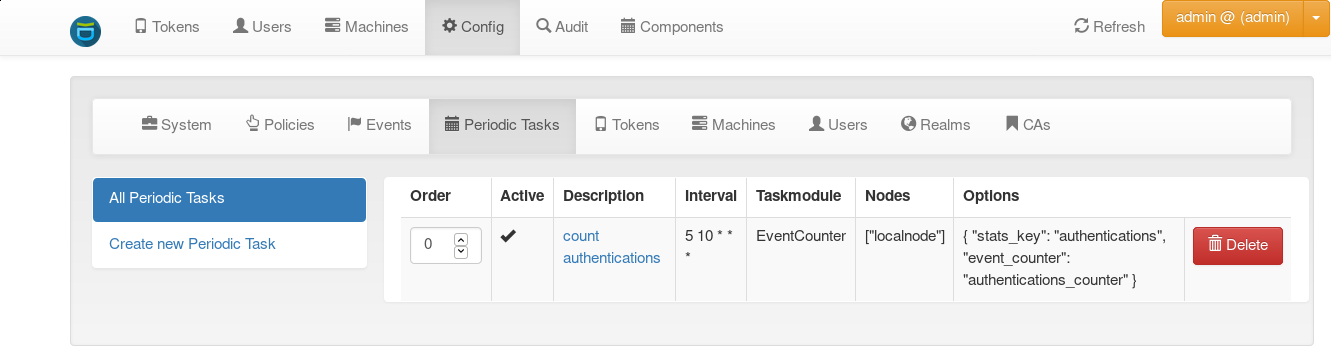
Periodic task definitions
Every periodic task has the following attributes:
- description
A human-readable, unique identifier
- active
A boolean flag determining whether the periodic task should be run or not.
- order
A number (at least zero) that can be used to rearrange the order of periodic tasks. This is used by
privacyidea-cronto determine the running order of tasks if multiple periodic tasks are scheduled to be run. Tasks with a lower number are run first.- interval
The periodicity of the task. This uses crontab notation, e.g.
*/30 * * * *runs the task every 30 minutes.Keep in mind that the entry in the system crontab determines the minimal resolution of periodic tasks: If you specify a periodic task that should be run every two minutes, but the
privacyidea-cronscript is invoked every five minutes only, the periodic task will actually be executed every five minutes!- nodes
The names of the privacyIDEA nodes on which the periodic task should be executed. This is useful in a redundant master-master setup, because database-related tasks should then only be run on one of the nodes (because the replication will take care of propagating the database changes to the other node). The name of the local node as well as the names of remote nodes are configured in The Config File.
- taskmodule
The task module determines the actual activity of the task. privacyIDEA comes with several task modules, see Task Modules.
- options
The options are a set of key-value pairs that configure the behavior of the task module. Each task module can have it’s own allowed options.
10.1. Task Modules
privacyIDEA comes with the following task modules:
10.2. The privacyidea-cron script
The privacyidea-cron script is used to execute periodic tasks defined in the Web UI. The
run_scheduled command collects all active jobs that are scheduled to run on the current node
and executes them. The order is determined by their ordering values (tasks with low values
are executed first). The -c option causes the script to is useful if the script is executed via the system
crontab, as it causes the script to only print to stderr in case of errors.
The list command can be used to get an overview of defined jobs, and the run_manually
command can be used to manually invoke tasks even though they are not scheduled to be run.
