5.3. System Config

The system configuration has two logical topics: Settings and token default settings.
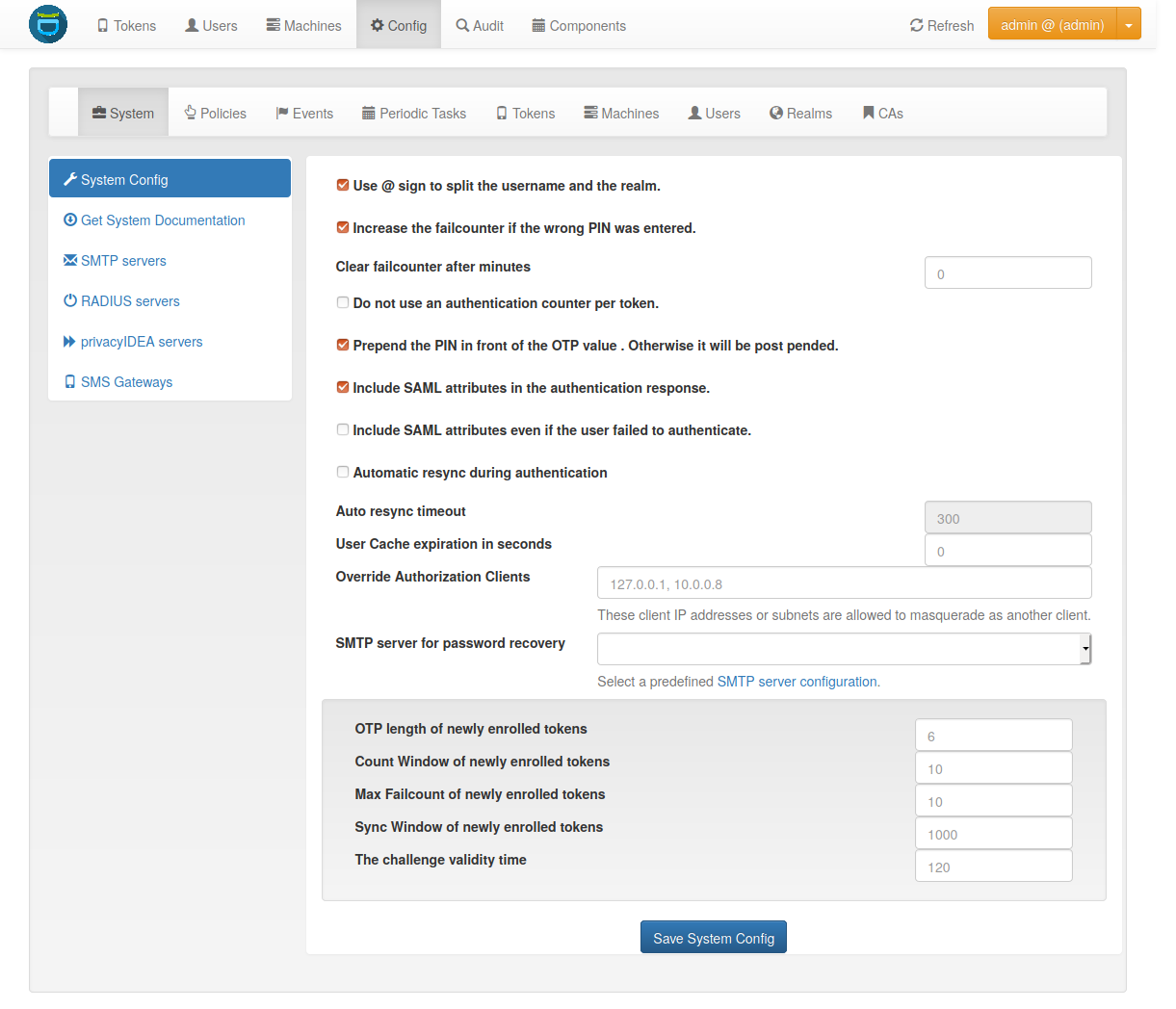
../_images/system-config.png

The system config

5.3.1. Settings

5.3.1.1. Use @ sign to split the username and the realm.

This option defines if the username like user@company given during authentication should be split into the loginname user and the realm name company. In most cases this is the desired behavior so this is enabled by default.

A name like user@gmail.com is only split if a realm gmail.com exists (see Relate User to a Realm). So you probably only want to disable splitting if users log in with email addresses whose domain is also the name of a realm.

How a user is related to a realm is described here: Relate User to a Realm

This option also affects the login via the Authentication endpoints

5.3.1.2. Increase the failcounter if the wrong PIN was entered.

If during authentication the given PIN matches a token but the OTP value is wrong, the failcounter of the tokens for which the PIN matches, is increased. This option is enabled by default: if the given PIN does not match any token, the failcounter of every token of the user that can still be used (active, not revoked, below its maximum failcount, within its validity period) is increased by one. So a series of requests with wrong PINs for a user name can lock all tokens of that user. If the option is disabled, a wrong PIN does not increase any failcounter.

5.3.1.3. Clear failcounter after minutes

When the failcounter reaches the maximum, the token gets a timestamp of the time the max fail count was reached. After the specified number of minutes has passed since that timestamp, any authentication attempt will clear the fail counter.

A 0 means that the automatic clearing of the fail counter is not used.

Note

After the maximum failcounter is reached, new requests will not update the mentioned timestamp.

Also see How to mitigate brute force and lock tokens.

5.3.1.4. Do not use an authentication counter per token.

Usually privacyIDEA keeps track of how often a token is used for authentication and how often this authentication was successful. This is a per token counter. This information is written to the token database as a parameter of each token.

This setting means that privacyIDEA does not track this information at all. Without the counter, the maximum number of authentications set for a token (count_auth_max, count_auth_success_max) is not enforced.

5.3.1.5. Prepend the PIN in front of the OTP value.

Defines if the OTP PIN should be given in front (pin123456) or in the back (123456pin) of the OTP value.

5.3.1.6. Automatic resync during authentication

Automatic resync defines if the system should try to resync a token if a user provides a wrong OTP value. AutoResync works like this:

  • If the counter of a wrong OTP value is within the resync window, the system remembers the counter of the OTP value for this token in the token info field otp1c.

  • Now the user needs to authenticate a second time within the time-interval given in Auto resync timeout with the next successive OTP value.

  • The system checks if the counter of the second OTP value is the successive value to otp1c.

  • If it is, the token counter is set and the user is successfully authenticated.

Note

AutoResync works for all HOTP and TOTP based tokens including SMS and Email tokens. For TOTP tokens, the second OTP value must belong to the time step directly after the remembered one. privacyIDEA uses at least three time steps as Auto resync timeout for TOTP tokens. The token shows each value for one time step, so the user needs up to two time steps to read both values. The third time step leaves time for the requests. Day password tokens are not resynchronized automatically.

5.3.1.7. User Cache expiration in seconds

This setting is used to enable the user cache and configure its expiration timeout. If its value is set to 0 (which is the default value), the user cache is disabled. Otherwise, the value determines the time in seconds after which entries of the user cache expire. For more information read User Cache.

Note

If the user cache is already enabled and you increase the expiration timeout, expired entries that still exist in the user cache could be considered active again!

5.3.1.8. Override Authorization Client

privacyIDEA uses the client IP of a request in the client condition of policies (see client_policies), in the client_ip condition of event handlers (see Conditions), in conditional access (see Conditional access policies) and in the authentication log. By default, the client IP is the address the connection comes from. Behind a reverse proxy or a load balancer, this is the proxy’s address for every request. A RADIUS server always connects with its own address, whichever RADIUS client sent the request.

This setting lets privacyIDEA take the client IP from what such a proxy reports instead. An HTTP reverse proxy adds the address it received the request from to the X-Forwarded-For HTTP header. A RADIUS server or another application plugin may send the address of its client in the API parameter client. The client parameter is only evaluated for /validate/, /ttype/ and /auth requests, and only if it is a string; the X-Forwarded-For header for every request. Other headers, such as Forwarded or X-Real-IP, are ignored.

This field takes a comma separated list of sequences of IP Networks mapping to other IP networks.

How the client IP is determined

privacyIDEA builds the path of a request from itself towards the client:

  1. the address the connection comes from,

  2. the entries of the X-Forwarded-For header from right to left. Every proxy appends the address it received the request from, so the rightmost entry was written by the proxy closest to privacyIDEA, and the leftmost entry names the original client,

  3. the client parameter, if the endpoint evaluates it.

Each entry of this setting is compared with this path position by position: its first network with the address the connection comes from, its second network with the next address of the path, and so on. An entry applies if each of its networks contains the address at its position. The address at the entry’s last position is then the client IP. If several entries apply, the one that reaches furthest along the path wins. If no entry applies, the client IP is the address the connection comes from.

An entry never looks further along the path than it has networks. Entries that a client writes into the X-Forwarded-For header it sends end up on the far side of the entry that its proxy appends, so they are ignored.

Warning

Every network of an entry except the last one is trusted to report the next address of the path. A host in such a network can pick its client IP from the entry’s last network, with the X-Forwarded-For header or the client parameter, and with it which policies apply to its requests and which conditional-access blocks hit it. List only your proxies and RADIUS servers, as narrowly as possible, and no network that end users connect from.

For the same reason, a listed proxy must add the address it received the request from to the header. A proxy or load balancer that passes the header on unchanged lets the client write the address that privacyIDEA takes from it. With nginx, proxy_set_header X-Forwarded-For $proxy_add_x_forwarded_for; appends the address. Apache appends it by default when it forwards a request with ProxyPass.

privacyIDEA does not check this setting when you save it. If an entry is not a valid address or network, privacyIDEA writes an error to the log for every request and ignores the whole setting: the client IP is then always the address the connection comes from.

Examples

10.1.2.0/24 > 192.168.0.0/16

Proxies in the subnet 10.1.2.0/24 may mask as client IPs 192.168.0.0/16. In this case the policies for the corresponding client in 192.168.x.x apply.

172.16.0.1

The proxy 172.16.0.1 may mask as any arbitrary client IP, IPv4 or IPv6. To allow only IPv4 clients, write 172.16.0.1 > 0.0.0.0/0.

10.0.0.18 > 10.0.0.0/8

The proxy 10.0.0.18 may mask as any client in the subnet 10.x.x.x.

Note that the proxy definitions may be nested in order to support multiple proxy hops. As an example:

10.0.0.18 > 10.1.2.0/24 > 192.168.0.0/16

means that the proxy 10.0.0.18 may map to another proxy into the subnet 10.1.2.x, and a proxy in this subnet may mask as any client in the subnet 192.168.x.x.

With the same configuration, a proxy 10.0.0.18 may map to an application plugin in the subnet 10.1.2.x, which may in turn use a client parameter to mask as any client in the subnet 192.168.x.x.

A nested entry only applies to requests that passed all listed hops. For requests that only pass the first proxy, or that come directly from the second, add separate entries such as 10.0.0.18 > 10.1.2.0/24 or 10.1.2.0/24 > 192.168.0.0/16.

For example, a client 192.168.0.10 sends a request to a reverse proxy at 10.1.2.3, which forwards it to a second proxy at 10.0.0.18, which forwards it to privacyIDEA. privacyIDEA receives the connection from 10.0.0.18 with the header X-Forwarded-For: 192.168.0.10, 10.1.2.3, so the path is 10.0.0.18, 10.1.2.3, 192.168.0.10.

  • With 10.0.0.18 > 10.1.2.0/24 > 192.168.0.0/16, the client IP is 192.168.0.10.

  • With 10.0.0.18, the client IP is 10.1.2.3: the entry has two positions, and the second one is the first proxy.

  • With 10.0.0.18 > 192.168.0.0/16, the client IP is 10.0.0.18: 10.1.2.3 is not in 192.168.0.0/16, so the entry does not apply.

Address spellings

Some reverse proxies write an X-Forwarded-For entry with its source port (192.0.2.43:51234), bracket an IPv6 address ([2001:db8::1]), or do both ([2001:db8::1]:4711). privacyIDEA accepts these spellings. A link-local address with a zone (fe80::1%eth0), as the operating system reports a link-local peer, is read without the zone, also when this setting is empty.

A dual-stack listener reports the peer of an IPv4 connection in the IPv4-mapped form (::ffff:10.0.0.1). This form stands for the IPv4 address. The client IP of such a client is 10.0.0.1, also when this setting is empty. The authentication log keeps the reported form in peer_ip and ip_chain.

In this setting and in the client conditions of policies and event handlers, an IPv4 network also contains the mapped form of its addresses. A network in the mapped form, such as ::ffff:10.0.0.0/104, also contains the plain IPv4 addresses. Other IPv6 networks only contain the form that is written. For example, ::/0 contains ::ffff:10.0.0.1, but not the client IP 10.0.0.1.

An entry of the path that is not a valid address in any of these spellings, such as unknown, ends the path at its position. The addresses before it can still become the client IP. The addresses after it are recorded in the authentication log, but never become the client IP. If the proxy closest to privacyIDEA writes such a value, the client IP is the address of that proxy.

Note

Every authentication-log entry records not only which client IP was used but how it was arrived at: the effective address (source_ip), the address the connection actually came from (peer_ip), which of the two - or which forwarded hop - was chosen (source_ip_source), and the whole path that was considered (ip_chain). The X-Forwarded-For chain and any client parameter are recorded even when this setting is empty and they are therefore not honored, so the log shows what a request claimed as well as what privacyIDEA believed. Only source_ip is ever used for a decision; everything past peer_ip is client-supplied.

source_ip_source distinguishes REMOTE_ADDR (no mapping is configured) from REMOTE_ADDR_UNMAPPED (a mapping is configured, but this peer may not map the client any further), which is what makes a misconfigured proxy path visible in the log rather than silent. X_FORWARDED_FOR and CLIENT_PARAM mean that the client IP was taken from the header or the client parameter. To check your entries, send a request through your proxies and compare these fields with what you expect.

5.3.1.9. SMTP server for password recovery

Specify the SMTP server configuration which should be used for sending password recovery emails.

5.3.2. Token default settings

Note

The following settings are token specific values which are set during enrollment. Some of these values can be overridden by policies or events during rollout.

5.3.2.1. OTP length of newly enrolled tokens

This is the default length of the OTP value of OATH-based tokens like SMS, Email, TOTP and HOTP. It is used when the enrollment request contains no OTP length, e.g. an API request without otplen. The current WebUI presets the OTP length in its HOTP and TOTP enrollment forms with this value; the previous WebUI sends 6 for every token type. An hotp_otplen or totp_otplen policy replaces the sent value on the server.

5.3.2.2. Count Window of newly enrolled tokens

This setting defines how many OTP values will be calculated during an authentication request to check for a match. This applies to counter-based tokens (HOTP, Email, SMS). TOTP tokens use their time window instead, which a new TOTP token gets from the TOTP token configuration (totp.timeWindow, default 180 seconds).

5.3.2.3. Max Failcount of newly enrolled tokens

This setting defines the maximum failcounter for newly enrolled tokens. When the failcounter reaches this number, the token cannot be used until the failcounter is reset (by an administrator, or automatically, see Clear failcounter after minutes).

Note

In fact the failcounter will only increase up to this maximum failcount (Maxfail). Even if more failed authentication requests occur, the failcounter will not be increased.

5.3.2.4. Sync Window of newly enrolled tokens

This setting defines the synchronization window for newly enrolled tokens. The window defines how many OTP values will be calculated during a resync of the token.

Note

In case of HOTP token, this is the amount of steps that will be calculated from the current token counter onwards. For TOTP token, the number of steps will be multiplied with the timestep of the token and this interval will be checked before and after the current time.

5.3.2.5. The challenge validity time

This setting defines the timeout for a challenge response authentication. If the response is received after the given time interval, the response is not accepted anymore.

A token type can have its own value in the config key <Type>ChallengeValidityTime, e.g. HotpChallengeValidityTime, TiqrChallengeValidityTime, PushChallengeValidityTime (see Push Token) or WebauthnChallengeValidityTime (see WebAuthn Token Config); this setting is used for types without their own value. Email and SMS tokens do not use it: their challenges are valid for the OTP validity time of their token configuration (default 120 seconds for Email, 300 seconds for SMS), see Email Token Configuration and SMS Token Configuration.

To clean up expired challenges read the Clean up challenges section.