9. Event Handler
Added in version 2.12.
What is the difference between Policies and event handlers?
Policies are used to define the behaviour of the system. With policies you can change the way the system reacts.
With event handlers you do not change the way the system reacts. But on certain events you can trigger a new action in addition to the behaviour defined in the policies.
These additional actions are also logged to the audit log. These actions are marked as EVENT in the audit log and you can see, which event triggered these actions. Thus a single API call can cause several audit log entries: One for the API call and more for the triggered actions.
9.1. Events
Each API call is an event and you can bind arbitrary actions to each event as you like. You can bind several actions to one event. These actions are executed in the order of the priority one after another.
Note
An action, that is triggered by an event can not trigger a new action. Only events (API calls) can trigger actions. E.g. if you are using the Token Handler Module to create a new token, the creation of the token is an action, not an event. This means this creation of the token can not trigger a new action. For more complex actions, you might need to look into the Script Handler Module.
Internally events are marked by a decorator “event” with an event identifier. At the moment not all events might be tagged. Please drop us a note to tag all further API calls.
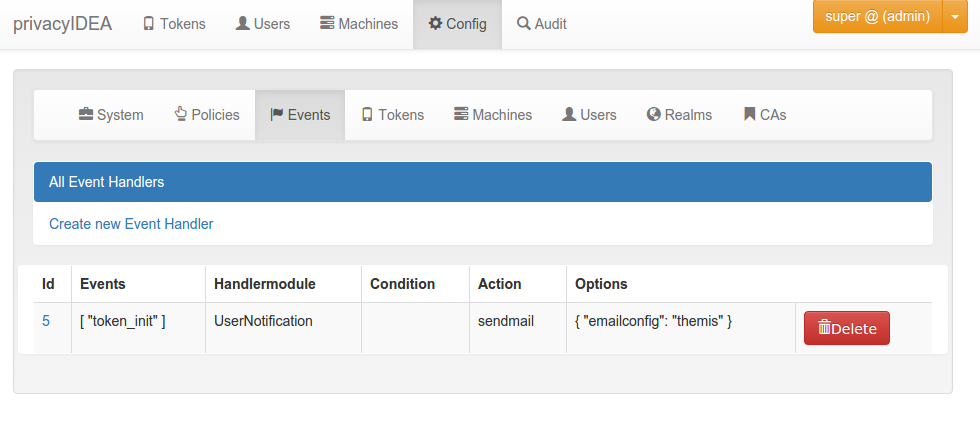
An action is bound to the event token_init.
9.2. Pre and Post Handling
Added in Version 2.23.
With most event handlers you can decide if you want the action to be taken before the actual event or after the actual event. I.e. if all conditions would trigger certain actions the action is either triggered before (pre) the API request is processed or after (post) the request is processed.
Up to version 2.22 all actions where triggered after the request. In this case additional information from the response is available. E.g. if a user successfully authenticated the event will know the serial number of the token, which the user used to authenticate.
If the action is triggered before the API request is processed, the event can not know if the authentication request will be successful or which serial number a token would have. However, triggering the action before the API request is processed can have some interesting other advantages:
9.2.1. Example for Pre Handling
The administrator can define an event definition that would trigger on the event validate/check in case the
the authenticating user does not have any token assigned.
The pre event definition could call the Tokenhandler with the enroll action and enroll an email token with dynamic_email for this very user.
When the API request validate/check is now processed, the user actually now has an email token and can authenticate
via challenge response with this very email token without an administrator ever enrolling or assigning a token for this
user.
9.3. Handler Modules and Actions
The actions are defined in handler modules. So you bind a handler module and the action, defined in the handler module, to the events.
The handler module can define several actions and each action in the handler module can require additional options.
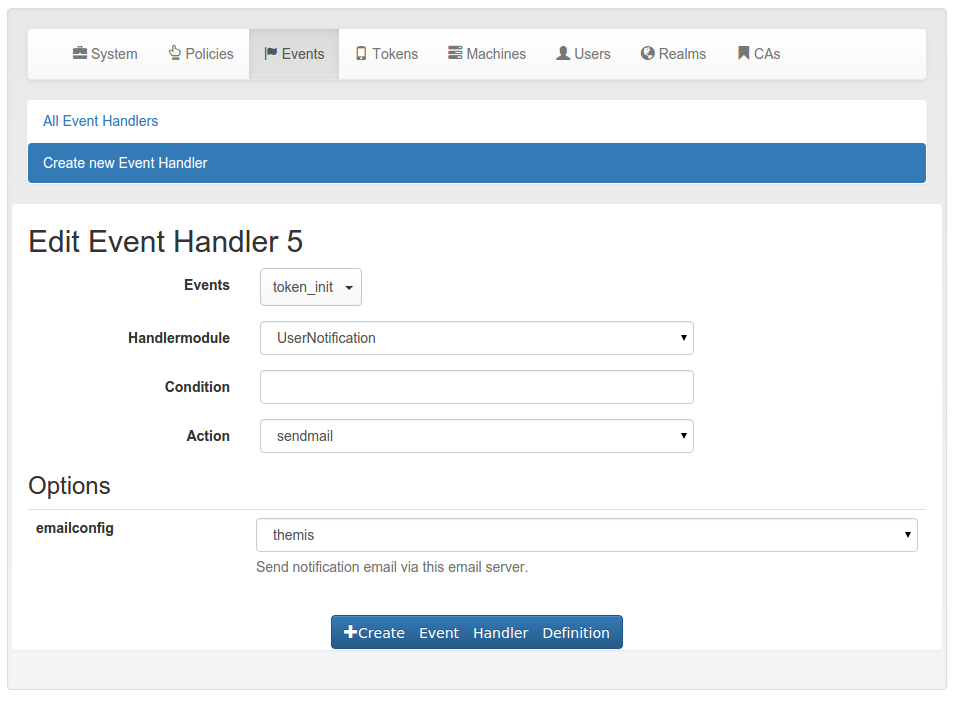
The event sendmail requires the option emailconfig.
9.4. Conditions
Added in version 2.14
An event handler module may also contain conditions. Only if all conditions are fulfilled, the action is triggered. Conditions are defined in the class property conditions and checked in the method check_condition. The base class for event handlers currently defines those conditions. So all event handlers come with the same conditions.
Note
In contrast to other conditions, the checking for the following conditions also evaluates to true, if this
information can not be checked: serial, client_ip, user_token_number, user_container_number, and
any condition based on a token or container if the according token or container object is not available.
I.e. if a request does not contain a serial or if the serial can not be determined, this condition will be
evaluated as fulfilled.
Event Handlers are a mighty and complex tool to tweak the functioning of your privacyIDEA system. We recommend to test your definitions thoroughly to assure your expected outcome.
Invalid conditions are evaluated to False. Errors are logged, but not raised to not break the request.
9.4.1. Comparators
In some conditions you need to use comparators to define how the condition should be checked. Generally the following comparators are available:
==evaluates to true if both values are equal. Allows comparison of strings, integers, and dates in isoformat.!=evaluates to true if this is not the case.
>evaluates to true if the left value is greater than the right value. Allows comparison of integers and dates in isoformat.
<evaluates to true if the left value is less than the right value. Allows comparison of integers and dates in isoformat.
matchesevaluates to true if the left value matches the right value as a regular expression. Allows comparison of strings.!matchesevaluates to true if this is not the case.
inevaluates to true if the left value is contained in the comma-separated list on the right. Only allows strings.!inevaluates to true if this is not the case.
containsevaluates to true if the left value is a list containing the right value. Only allows strings.!containsevaluates to true if this is not the case.
string_containsevaluates to true if the left value (a string) contains the right value as a substring.!string_containsevaluates to true if this is not the case.
date_beforeevaluates to true if the left value is a date and time that occurs before the right value. Both values must be a date in ISO format (e.g. “YYYY-MM-DD hh:mm:ss±hh:mm”).
date_afterevaluates to true if the left value is a date and time that occurs after the right value. Both values must be a date in ISO format (e.g. “YYYY-MM-DD hh:mm:ss±hh:mm”).
date_within_lastevaluates to true if the left-hand value is a date and time that falls within the past time interval specified by the right-hand value.!date_within_lastevaluates to true if this is not the case. The right-hand value must be a duration expressed as an integer immediately followed by a time unit:
yfor years
dfor days
hfor hours
mfor minutes
sfor secondsFor example, “7d” means “within the last 7 days”, “2h” means “within the last 2 hours”.
Usually, comparators should be wrapped in single quotes, e.g. '=='1000 or '>'1000. Due to backwards
compatibility, the basic comparators (==, !=, >, <) can also be used without quotes.
9.4.2. Basic conditions
The basic event handler module has the following conditions.
client_ip
The action is triggered if the client IP matches this value. The value can be a comma-separated list of single addresses or networks. To exclude entries, put a minus sign:
192.168.0.0/24,-192.168.0.12,10.0.0.2
count_auth
This can be '>'100, '<'99, or '=='100, to trigger the action, if the tokeninfo field ‘count_auth’
is bigger than 100, less than 99 or exactly 100. You can use all Comparators that support integers.
count_auth_fail
This can be '>'100, '<'99, or '=='100, to trigger the action, if the difference between
the tokeninfo field ‘count_auth’ and ‘count_auth_success is bigger than 100,
less than 99 or exactly 100. You can use all Comparators supporting integers.
count_auth_success
This can be '>'100, '<'99, or '=='100, to trigger the action, if the tokeninfo field
‘count_auth_success’ is bigger than 100, less than 99 or exactly 100. You can use all Comparators
that support integers.
failcounter
This is the failcount of the token. It is increased on failed authentication
attempts. If it reaches max_failcount increasing will stop and the token is locked.
See failcount.
The condition can be set to '>'9, '=='10, or '<'5 and it will trigger the action accordingly. You can use
all Comparators that support integers.
detail_error_message
This condition checks a regular expression against the detail section in
the API response. The field detail->error->message is evaluated.
Error messages can be manyfold. In case of authentication you could get error messages like:
“The user can not be found in any resolver in this realm!”
With token/init you could get:
“missing Authorization header”
Note
The field detail->error->message is only available in case of an
internal error, i.e. if the response status is ``False.
detail_message
This condition checks a regular expression against the detail section in
the API response. The field detail->message is evaluated.
Those messages can be manyfold like:
"wrong otp pin"
"wrong otp value"
"Only 2 failed authentications per 1:00:00"
Note
The field detail->message is available in case of status True,
like an authentication request that was handled successfully but failed.
detail_message
Here you can enter a regular expression. The condition only applies if the regular
expression matches the detail->message in the response.
last_auth
This condition checks if the last authentication is older than the specified
time delta. The timedelta is specified with “h” (hours), “d” (days) or “y”
(years). Specifying 180d would mean, that the action is triggered if the
last successful authentication with the token was performed more than 180
days ago.
This can be used to send notifications to users or administrators to inform them, that there is a token, that might be orphaned.
logged_in_user
This condition checks if the logged in user is either an administrator or a normal user. This way the administrator can bind actions to events triggered by normal users or e.g. by help desk users. If a help desk user enrolls a token for a user, the user might get notified.
If a normal user enrolls some kind of token, the administrator might get notified.
otp_counter
The action is triggered, if the otp counter of a token has reached the given
value. You can use all Comparators that support integers, e.g. '<'100.
The administrator can use this condition to e.g. automatically enroll a new paper token for the user or notify the user that nearly all OTP values of a paper token have been spent.
realm
The condition realm matches the user realm. The action will only trigger, if the user in this event is located in the given realm.
This way the administrator can bind certain actions to specific realms. E.g. some actions will only be triggered, if the event happens for normal users, but not for users in admin- or helpdesk realms.
resolver
The resolver of the user, for which this event should apply.
result_status
The result.status within the response is True or False.
result_value
This condition checks the result of an event.
E.g. the result of the event validate_check can be a failed authentication. This can be the trigger to notify either the token owner or the administrator.
result_authentication
This checks the entry result->authentication in the response. Possible values are “ACCEPT”, “REJECT”, “DECLINED” and “CHALLENGE”. It is an enhancement to result_value. If result_value is true, the result_authentication will be “ACCEPT”. If result_value is false, the result_authentication can be “CHALLENGE”, “REJECT” or “DELINCED”.
rollout_state
This is the rollout_state of a token. A token can be rolled out in several steps
like the 2step HOTP/TOTP token. In this case the attribute “rollout_state” of the
token contains certain values like clientwait or enrolled.
This way actions can be triggered, depending on the step during an enrollment
process.
serial
The action will only be triggered, if the serial number of the token in the event does match the regular expression.
This is a good idea to combine with other conditions. E.g. only tokens with a certain kind of serial number like Google Authenticator will be deleted automatically.
token_has_owner
The action is only triggered, if the token is or is not assigned to a user.
token_is_orphaned
The action is only triggered, if the user, to whom the token is assigned, does not exist anymore.
token_locked
The action is only triggered, if the token in the event is locked, i.e. the maximum failcounter is reached. In such a case the user can not use the token to authenticate anymore. So an action to notify the user or enroll a new token can be triggered.
token_validity_period
Checks if the token is in the current validity period or not. Can be set to True or False.
Note
token_validity_period==False will trigger an action if either the
validity period is either over or has not started, yet.
tokeninfo
The tokeninfo condition can compare any arbitrary tokeninfo field against a fixed value. You can compare strings and integers. Integers are converted automatically. You can use all Comparators, but ensure that the comparator supports the datatype of your values. Valid comparisons are:
myValue '==' 1000
myValue '>' 1000
myValue '<' 99
myTokenInfoField '==' EnrollmentState
myTokenInfoField '<' ABC
myTokenInfoField '>' abc
myTokenInfoField 'date_after' 2017-10-12 10:00+02:00
myTokenInfoField 'date_within_last' 7d
“myValue” and “myTokenInfoField” being any possible tokeninfo fields.
Starting with version 2.20 you can also compare dates in the isoformat like that:
myValue '>' 2017-10-12T10:00+0200
myValue '<' 2020-01-01T00:00+0000
In addition you can also use the tag {now} to compare to the current time
and you can add offsets to {now} in seconds, minutes, hours or days:
myValue '<' {now}
myValue '>' {now}+10d
myValue '<' {now}-5h
Which would match if the tokeninfo myValue is a date, which is later than 10 days from now or it the tokeninfo myValue is a date, which is 5 more than 5 hours in the past.
tokenrealm
In contrast to the realm this is the realm of the token - the tokenrealm. The action is only triggered, if the token within the event has the given tokenrealm or no tokenrealm at all. This can be used in workflows, when e.g. hardware tokens which are not assigned to a user are pushed into a kind of storage realm.
tokenresolver
The resolver of the token, for which this event should apply. The action is also triggered if the token (the token owner) is in no resolver at all.
tokentype
The action is only triggered if the token in this event is of the given type. This way the administrator can design workflows for enrolling and re-enrolling tokens. E.g. the tokentype can be a registration token and the registration code can be easily and automatically sent to the user. If the token does not exist yet (like with a pre-event handler for token_init), this condition gets ignored.
user_token_number
The action is only triggered, if the user in the event has the given number of tokens assigned.
This can be used to e.g. automatically enroll a token for the user if the user has no tokens left or to notify the administrator if the user has a certain amount of tokens assigned.
You can use all Comparators that support integers, e.g. '=='0.
user_container_number
The action is only triggered, if the number of containers assigned to the user in the event matches the given condition.
You can use all Comparators that support integers, e.g. '=='0.
counter
The counter condition can compare the value of any arbitrary event counter against a fixed value. You can use all Comparators that support integers. Valid comparisons are:
myCounter '==' 1000
myCounter '>' 1000
myCounter '<' 1000
“myCounter” being any event counter set with the Counter Handler Module.
Note
A non-existing counter value will compare as 0 (zero).
challenge_session
The challenge_session condition can compare the value of the session attribute of a challenge against a regular expression. Usual values of the session are:
enrollment during a multi challenge enrollment process and
challenge_declined if the challenge of a PUSH token was declined by the user.
This way, the administrator can check for declined PUSH authentications and take according actions to implement PUSH fatigue mitigations like notifying the helpdesk (see User Notification Handler Module), disabling the token or increasing a counter in the tokeninfo (see Token Handler Module).
challenge_expired
This is a boolean check if the challenge has expired. Each challenge has an expiration date. If this exceeded this condition evaluates to True.
token_is_in_container
The action is only triggered, if the token is or is not in a container.
container_state
The action is only triggered if the container is in all specified states. The container can have other states besides the given value.
container_exact_state
The action is only triggered if the container is exactly in all specified states. No additional states are allowed.
container_has_owner
The action is only triggered if the container is or is not assigned to a user.
container_type
The action is only triggered if the container is of the given type.
container_has_token
The action is only triggered if the container has or has not at least one token.
container_info
The container_info condition can compare any arbitrary container info field against a fixed value. You can compare
strings, integers, and dates in isoformat. Integers and dates are converted automatically. You can use all
Comparators, but ensure that the used comparator fits the data type of your values.
Valid comparisons are:
myValue '==' 1000
myValue '>' 1000
myValue '<' 99
myInfoField '==' EnrollmentState
myInfoField '<' ABC
myInfoField '>' abc
myInfoField 'date_after' 2017-10-12 10:00+02:00
myInfoField 'date_within_last' 7d
“myValue” and “myTokenInfoField” being any possible tokeninfo fields.
container_realm
The action is only triggered if the container is in this realm or in no realm at all. If multiple realms are selected, the action is triggered if the container is in at least one of the realms. The condition is not checked if the container has no realm, hence the action would be triggered.
container_resolver
The action is only triggered if the owner of the container is in the given resolver or the container has no owner at all. If multiple resolvers are selected, the condition is fulfilled if at least one owner is in one resolver. The condition is not checked if the container has no owner, hence the action would be triggered.
container_last_auth
The action is only triggered if the last authentication of the container is older than the specified time delta.
The time value has to be an integer followed by a time unit.
Supported units are: y (years), d (days), h (hours), m (minutes), s (seconds)
Only one unit is allowed.
Examples: '8h', '7d', '1y'
container_last_sync
The action is only triggered if the last synchronization of the container is older than the specified time delta.
The time value has to be an integer followed by a time unit.
Supported units are: y (years), d (days), h (hours), m (minutes), s (seconds)
Only one unit is allowed.
Examples: '8h', '7d', '1y'
9.5. Managing Events
Using the command pi-manage config event you can list, delete, enable and disable events.
You can also export the complete event definitions to a file or import the event definitions from a file again.
During import you can specify if you want to remove all existing events or if you want to add the events from the file
to the existing events in the database.
Note
Events are identified by an id! Due to database restrictions the id is ignored during import. So importing an event with the same name will create a second event with the same name but another id.
9.6. Available Handler Modules
- 9.6.1. User Notification Handler Module
- 9.6.2. Token Handler Module
- 9.6.3. Script Handler Module
- 9.6.4. Counter Handler Module
- 9.6.5. Federation Handler Module
- 9.6.6. RequestMangler Handler Module
- 9.6.7. ResponseMangler Handler Module
- 9.6.8. Logging Handler Module
- 9.6.9. Custom User Attribute Handler Module
- 9.6.10. WebHook Handler Module
- 9.6.11. Container Handler Module