13.1. Import
Seed files that contain the secret keys of hardware tokens can be imported to the system via the menu Import.
The default import options are to import SafeNet XML file, OATH CSV files, Yubikey CSV files or PSKC files.
13.1.1. GPG Encryption
Starting with privacyIDEA 2.14 you can import GPG encrypted seed files. All files mentioned below can be encrypted this way.
privacyIDEA needs its own GPG key. You may create one like this:
mkdir /etc/privacyidea/gpg
GNUPGHOME=/etc/privacyidea/gpg gpg --gen-key
Then make sure, that the directory /etc/privacyidea/gpg is chown 700 for the user privacyidea.
Now you can export the public key and hand it to your token vendor:
GNUPGHOME=/etc/privacyidea/gpg gpg -a --export <keyid>
Now the token vendor can send the seed file GPG encrypted. You do not need to decrypt the file and store the decrypted file on a network folder. Just import the GPG encrypted file to privacyIDEA!
Note
Using the key PI_GNUPG_HOME in pi.cfg you can change the default above mentioned GNUPGHOME directory.
Note
privacyIDEA imports an ASCII armored file. The file needs to be encrypted like this:
gpg -e -a -r <keyid> import.csv
13.1.2. OATH CSV
This is a very simple CSV file to import HOTP, TOTP or OATH tokens. You can also convert your seed easily to this file format, to import the tokens.
The file format for TOTP tokens looks like this:
<serial>, <seed>, TOTP, <otp length>, <time step>
For HOTP tokens like:
<serial>, <seed>, [HOTP, <otp length>, <counter>]
For OCRA tokens it looks like this:
<serial>, <seed>, OCRA, <ocra suite>
serial is the serial number of the token that will also be used to identify the token in the database. Importing the same serial number twice will overwrite the token data.
seed is the secret key, that is used to calculate the OTP value. The seed is provided in a hexadecimal notation. Depending on the length either the SHA1 or SHA256 hash algorithm is identified.
type is either HOTP, TOTP or OCRA.
otp length is the length of the OTP value generated by the token. This is usually 6 or 8.
time step is the time step of TOTP tokens. This is usually 30 or 60.
ocra suite is the ocra suite of the OCRA token according to [1].
For TAN tokens it looks like this:
<serial>, <n/a>, TAN, <list of tans>
The list of tans is a whitespace separated list.
Note
The Hash algorithm (SHA1, SHA256, SHA512) is derived from the length of the seed. If the length of the seed does not match any Hash algorithm, the default SHA1 is used.
13.1.2.1. Import format version 2
A new import format allows to prepend a user, to whom the imported token should be assigned.
The file format needs to start with the first line
# version: 2
and the first three colums will be the user:
<username>, <resolver>, <realm>, <serial>, <seed>, <type>, …
Note
The import will bail out, if a specified user does not exist.
13.1.3. Yubikey CSV
Here you can import the CSV file that is written by the Yubikey Personalization GUI [2]. privacyIDEA can import all Yubikey modes, either Yubico mode or HOTP mode.
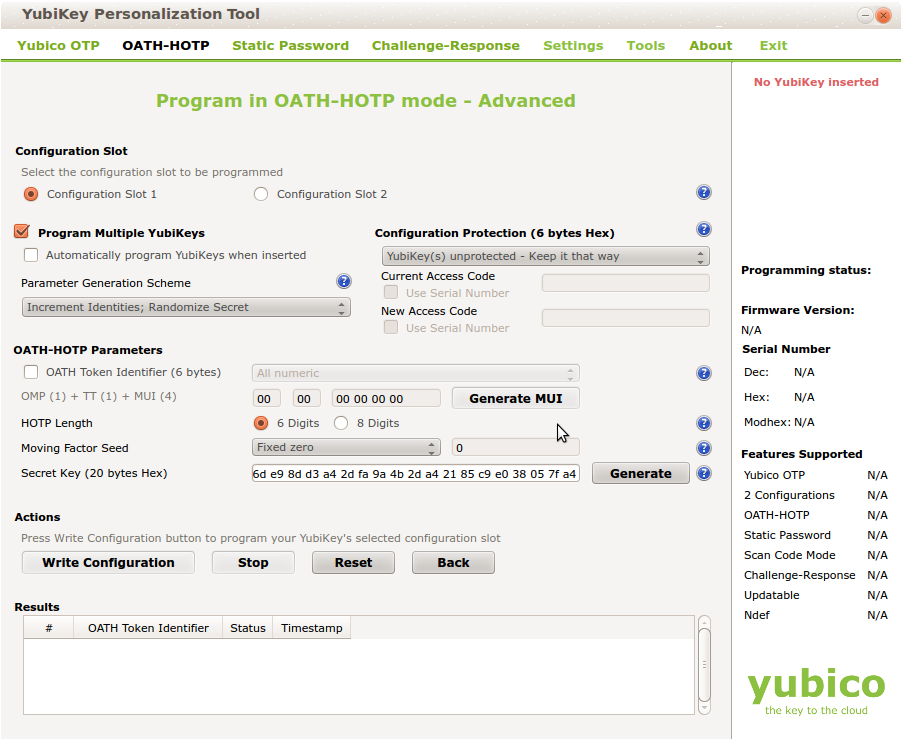
Note
The Yubikey in HOTP mode defaults to the Hash algorithm SHA1.
For more information about enrolling Yubikeys see Yubikey Enrollment Tools.
13.1.4. PSKC
The Portable Symmetric Key Container is specified in [3]. OATH compliant token vendors provide the token seeds in a PSKC file. privacyIDEA lets you import PSKC files. All necessary information (OTP length, Hash algorithm, token type) are read from the file.
Note
In PSKC the Hash algorithm is specified in the <Suite> tag.
If it is not specified, SHA1 is used as the default. The length of the
seed is not used to determine the Hash algorithm.
PSKC files can be encrypted - either with a password or an AES key. You can provide this during the upload.
13.1.5. SafeNet XML
Safenet or former Aladdin provided seed files in their own XML format. This is the format to choose, if you have a file, that looks like this:
<Tokens>
    <Token serial="00040008CFA5">
    <CaseModel>5</CaseModel>
    <Model>101</Model>
    <ProductionDate>02/19/2009</ProductionDate>
    <ProductName>Safeword Alpine</ProductName>
    <Applications>
    <Application ConnectorID="{ab1397d2-ddb6-4705-b66e-9f83f322deb9}">
    <Seed>123412354</Seed>
    <MovingFactor>1</MovingFactor>
    </Application>
    </Applications>
    </Token>

    <Token ...>
    ...
    </Token>
 </Tokens>
Note
The HASH algorithm defaults to SHA1. Unless the length of the seed is 64 characters, then SHA256 is assumed.
Note
This format is deprecated. Safenet nowadays might provide you an XML file, which is probably a PKCS file. Please check the file contents!